Driver payout automation is usually pitched as a way to save the finance team a weekend a month. That is true, but it undersells the point. The real cost of manual pay and billing is not the hours; it is the disputes. A Captain who believes they drove 210 km and a spreadsheet that says 184 km will argue about it. A Shipper who was quoted a zone rate and receives an invoice with an unexplained surcharge will withhold payment. Both problems have the same root cause: two records of the same trip that disagree.
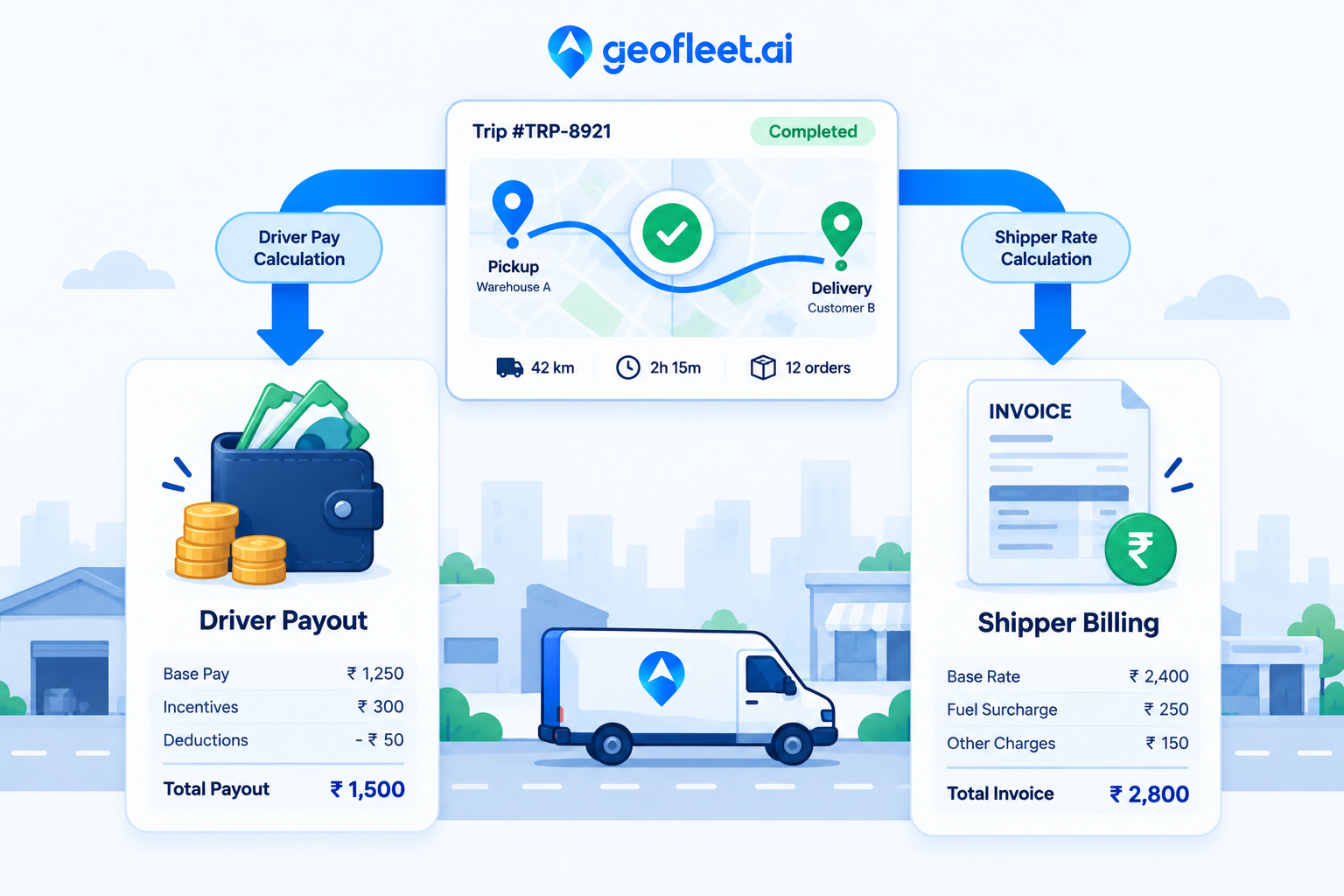
Geofleet handles this by deriving both Captain pay and Shipper billing from one verified trip record. The two configurations live under Settings, Finance: Captain Payout Configuration on the cost side and Shipper Rate Chart on the revenue side. This post explains what each contains, why they must share the same source of truth, how COD collections reconcile against payouts, and how the results flow into accounting.
The Verified Trip Record: One Source for Both Sides
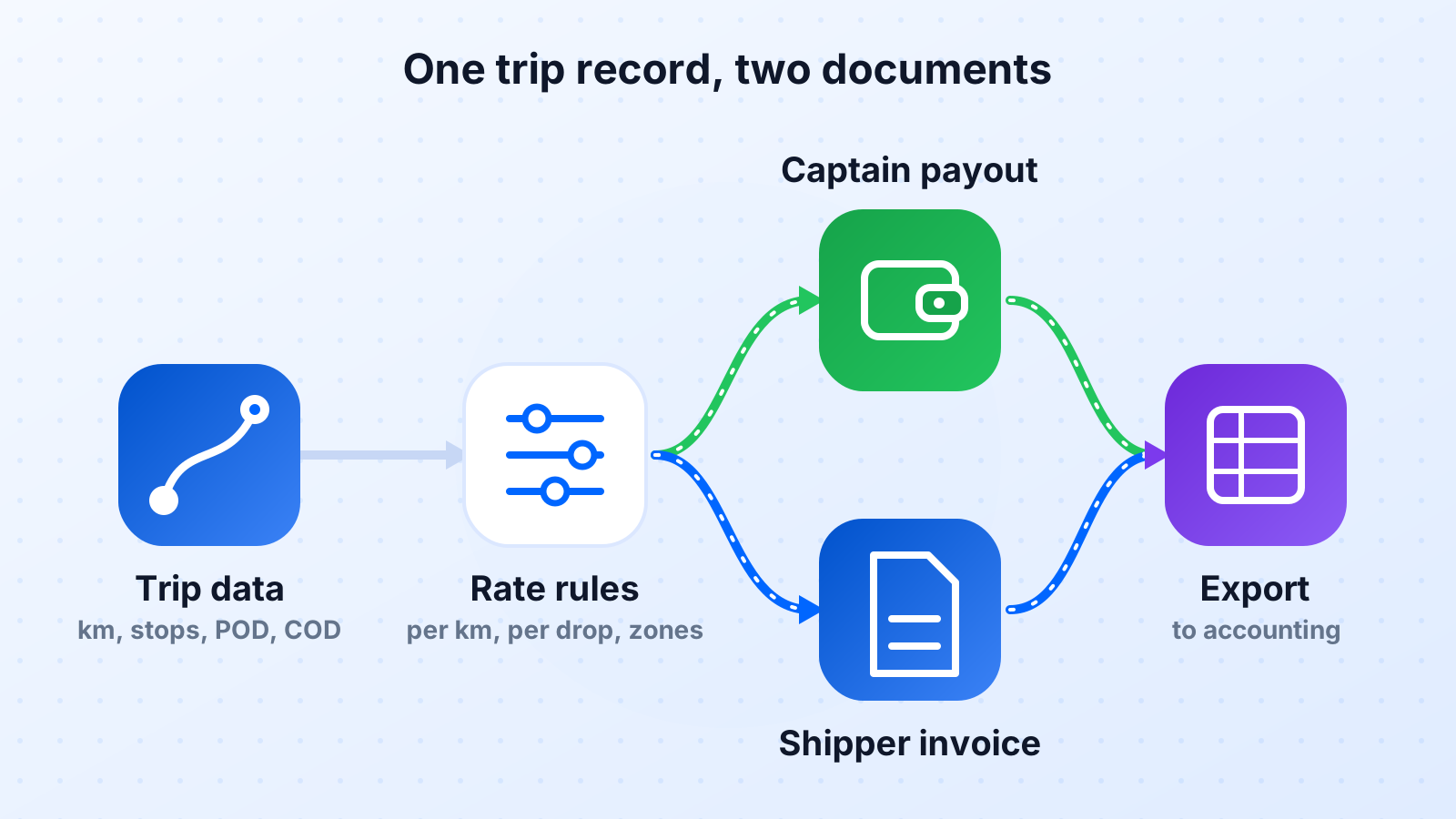
Everything starts with the trip. For each completed route, Geofleet holds the route start and end timestamps, the GPS-derived distance travelled, each stop with its arrival and departure time, the proof-of-delivery event at each stop (photo, signature, OTP, or scan), the outcome (delivered, partial, failed, returned), any COD amount collected, and the Captain and vehicle that ran it. Distance can be cross-checked against odometer or OBD readings where the fleet reports them, a topic covered in detail in the fleet billing post linked below.
That record is the input to both the payout engine and the billing engine. When a Captain queries their statement, the line item links to the route and the POD events. When a Shipper queries an invoice, the line item links to the same route and the same POD events. There is nothing to reconcile between pay and billing because they were never separate calculations over separate data.
What "verified" means in practice
A stop counts for pay and billing only when it has a POD event with a timestamp inside the delivery record and a location within a configurable radius of the address. A stop marked delivered with no POD, or with a POD captured 2 km away, is flagged for review before it reaches either statement.
Captain Payout Configuration: Modelling How You Pay
Most operators pay Captains using a mix of components rather than a single rate. The payout configuration lets you express that mix as rules. A configuration might combine several of the following, and different Captain groups (employees, contractors, fleet partners) can carry different configurations.
| Component | Basis | Example rule |
|---|---|---|
| Per-drop rate | Each verified delivered stop | Fixed amount per successful drop; reduced amount for failed attempt with POD |
| Per-km rate | GPS distance on the route, optionally capped against planned distance | Rate per km beyond a base allowance |
| Per-hour or shift rate | Route duration or logged shift time | Hourly rate with a minimum guarantee per shift |
| Tiered incentives | Drops per day or week crossing thresholds | Bonus per drop above a daily threshold; weekly bonus at a target |
| Quality incentives | On-time rate, POD completeness, customer rating | Bonus when weekly on-time rate exceeds a target |
| COD handling fee | Cash collected and settled | Small fee per COD order settled on time |
| Deductions | Advances, damages, unsettled COD, fuel card | Deduct unsettled cash after the settlement deadline |
| Zone or time multipliers | Remote zones, night shifts, peak days | Multiplier on per-drop rate for defined zones or hours |
Payout cycles and statements
Cycles are typically weekly for contractors and monthly for employees, with a cutoff time after which the cycle locks. Each Captain receives a statement listing every route, its components, incentives earned, deductions applied, and the net amount. Because every line links back to a route, most questions are answered by the Captain opening the route rather than raising a ticket. Disputes that remain are about facts (was this stop delivered?) rather than arithmetic, and the POD record settles them.
Fleet partners and sub-fleets
If you use third-party fleet partners, the same configuration applies at the partner level: a payout rule set for the partner, with the partner statement aggregating the routes their Captains ran. This removes the monthly exercise of the partner sending you an invoice built from their own records.
Shipper Rate Chart: Turning the Contract Into a Lookup
A delivery rate card is the pricing a Shipper agreed to, expressed in a form the platform can evaluate per order. The rate chart configuration holds one or more rate cards per Shipper, each with dimensions and surcharges. When a trip is verified, each order on it is priced from the matching card and becomes an invoice line. A typical card is built from these dimensions.
- Zone: origin hub to destination zone, with zones defined as polygons or postcode groups.
- Weight or volume band: price steps by parcel weight or cubic volume.
- Distance band: price steps by GPS distance where zone pricing does not fit, common in B2B and field service.
- Service level: standard, same-day, express, scheduled window, cold-chain.
- Surcharges: COD handling, fragile, oversize, failed-attempt fee, waiting time at dock, remote area.
- Minimums and volume discounts: monthly minimum charge, or a lower rate once monthly volume passes a threshold.
| Zone | Up to 2 kg | 2 to 5 kg | 5 to 10 kg | Same-day surcharge | COD surcharge |
|---|---|---|---|---|---|
| Zone A (metro core) | 45 | 55 | 75 | +20 | +10 |
| Zone B (metro ring) | 55 | 70 | 95 | +25 | +10 |
| Zone C (outer suburbs) | 70 | 90 | 120 | +35 | +12 |
| Zone D (remote) | 110 | 140 | 180 | Not offered | +15 |
Failed attempts deserve explicit treatment in the card. Whether a failed attempt with valid POD is billable, at what rate, and how many attempts are included all need to be agreed up front. When the rule is in the rate card, the invoice line appears automatically with the POD photo attached, and the conversation with the Shipper is short.
Invoicing cadence
Most Shippers are invoiced monthly, with a statement listing every order, its rate card match, surcharges, and the POD reference. Some operators invoice weekly for high-volume e-commerce clients to shorten their receivables cycle. Either way, the invoice is a report over already-priced lines, not a calculation performed at month end, which is why it can be generated in minutes and why it matches what the Shipper sees in their portal.
"Before we moved billing onto the trip record, month-end was five days of matching driver sheets against client spreadsheets. Now the invoices go out on the first working day and the disputes are about two or three stops, not two or three hundred."
— Finance manager, regional courier company
Reconciling COD Collections With Payouts
Cash on delivery adds a third flow to the same trip record. The Captain collects cash at the door, the amount is logged against the order at POD time, and the Captain owes that cash to the company until it is deposited or handed over. Geofleet tracks this as a running balance per Captain, and the payout configuration decides how it interacts with pay.
- Each COD collection is recorded on the order with amount, method (cash, card on device, wallet), and timestamp.
- The Captain’s cash balance increases by the amount collected.
- A settlement, deposit, or hub handover reduces the balance, with a receipt recorded.
- At the payout cycle cutoff, any unsettled balance past its deadline is either deducted from the payout or held as a flag, depending on configuration.
- The Shipper invoice shows COD collected per order, and a separate COD remittance statement shows what is owed back to the Shipper net of any COD surcharge.
The result is that three parties, Captain, company, and Shipper, are looking at the same collection events. The cash management feature and the COD operations guide linked below go deeper into settlement workflows and the controls around them.
Settle COD before the payout cutoff
Set the COD settlement deadline at least one day before the payout cycle locks. Captains then have a clear window to deposit, the finance team sees a clean balance when statements generate, and deductions become the exception rather than a weekly argument.
Exports to Accounting and ERP
Payout statements and Shipper invoices are only useful if they reach your accounting system without re-keying. Geofleet supports scheduled exports of payout statements, invoices, and COD remittances in formats your finance system can import, and a direct Acumatica integration for operators running that ERP. The Acumatica post in this batch covers the order-to-dispatch side; on the finance side, the same connection can carry invoice lines to receivables and payout lines to payables.
For teams on other systems, exports keyed by Shipper, Captain, route, and order ID let you map lines into your chart of accounts. Keep the route and order IDs on every line: they are the audit trail back to the POD evidence when an auditor or a client asks.
Setting It Up: A Practical Sequence
- Confirm the trip record is trustworthy first. Check that POD is captured on every stop and that GPS distance matches odometer within a tolerance you are comfortable with. Nothing downstream works without this.
- Write down how you pay Captains today, including the informal rules. Model them as payout components. If a rule cannot be expressed, ask whether it should exist.
- Enter each Shipper contract as a rate card. Where the contract is vague on surcharges or failed attempts, agree the rule with the Shipper before the first automated invoice.
- Run one cycle in parallel with your existing process. Compare statement to spreadsheet line by line and investigate every difference; most will be errors in the old process.
- Switch over, keep the parallel run for one more cycle at reduced scope, and connect the exports.
Related reading
Frequently asked questions
What is driver payout automation?
Driver payout automation calculates what each driver is owed from verified delivery data rather than manual logs. Rules such as per-drop, per-km, per-hour, tiered incentives, COD handling, and deductions are configured once, and the platform produces a statement per driver per pay cycle with every line linked to the route and proof-of-delivery record.
How is a delivery rate card structured?
A rate card maps order attributes to a price. Common dimensions are zone, weight or volume band, distance band, and service level, plus surcharges for COD, fragile, oversize, failed attempts, and remote areas, and rules for minimums and volume discounts. Each Shipper can have its own card, and orders are priced automatically when the trip is verified.
Why should driver pay and customer billing use the same data?
Because disputes come from disagreement between records. If pay is calculated from a driver log and billing from a client spreadsheet, the distances, stop counts, and outcomes will differ. Deriving both from one verified trip record with GPS distance and POD timestamps means both sides are settled with the same evidence.
How does COD reconciliation work with driver payouts?
Each cash collection is logged on the order at proof-of-delivery time and increases the driver’s cash balance. Deposits or hub handovers reduce it. At the payout cutoff, unsettled cash past its deadline can be deducted or flagged. The Shipper sees COD collected per order and a remittance statement for what is owed back.
Can payout statements and invoices be exported to accounting software?
Yes. Geofleet supports scheduled exports of payout statements, invoices, and COD remittances keyed by Shipper, Captain, route, and order ID, and provides an Acumatica integration for operators running that ERP. Keeping the IDs on every line preserves the audit trail to the delivery evidence.
How should failed delivery attempts be billed and paid?
Decide the rule up front and put it in both configurations. A common approach pays the driver a reduced per-drop amount for a failed attempt with valid POD and bills the Shipper a failed-attempt fee after a defined number of included attempts. With the POD photo attached to the line, disputes are rare.